
If an Avant test includes a writing section, a virtual keyboard may be needed for typing appropriate characters. Please read below to determine which steps, if any, must be completed prior to testing.
Languages That Do Not Need a Keyboard Activated
English, Cabo Verdean, Chin (Hakha), Chuukese, Czech, Filipino (Tagalog), French, German, Haitian Creole, Hawaiian, Hmong, Marshallese, Ilocano, Italian, Polish, Portuguese, Samoan, Somali Maay Maay, Somali Maxaa, Spanish, Swahili, Turkish, Yoruba, Yup’ik, Zomi
Cabo Verdean, Chin (Hakha), Chuukese, Czech, English, Filipino (Tagalog), French, German, Haitian Creole, Hawaiian (‘Ōlelo Hawai’i), Hmong, Ilocano, Italian, Marshallese, Polish, Portuguese (Brazilian), Samoan, Somali Maay Maay, Somali Maxaa, 스페인어, Swahili, Turkish, Yoruba, Yup’ik, Zomi
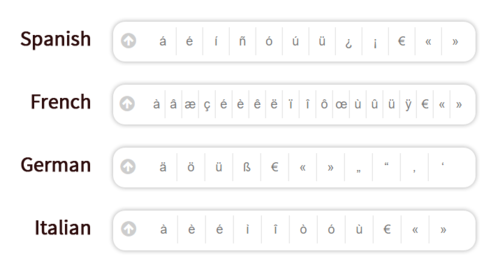
For the languages listed above, the test will include a character box where the appropriate symbols and accented letters are included and can be clicked. No additional action is required to set up a virtual keyboard for these languages.
Languages That Do Need A Keyboard Activated
The languages listed below all require a virtual keyboard to be loaded:
Amharic, Arabic, Armenian, Cantonese, Chinese (Mandarin) Simplified & Traditional, Hebrew, Hindi, Japanese, Kannada, Korean, Marathi, Russian, Tamil, Telugu, Ukrainian, Urdu, Vietnamese
Abkhazian, Amharic, Arabic – Algerian, Arabic – Arab Gulf, Arabic – Egyptian, Arabic – Iraqi, Arabic – Jordanian, Arabic – Lebanese, Arabic – Libyan, Arabic – Moroccan, Arabic – Palestinian, Arabic – Sudanese, Arabic – Syrian, Arabic – Tunisian, Arabic – Yemeni, Arabic (Modern Standard), Armenian, Bengali, Cantonese, Cantonese, Chăm, Dari, Georgian, Greek, Gujarati, Hebrew, Hindi, Japanese, Kannada, Karen (Kayah / Karenni), Khmer, Korean, Lao, Lisan ud-Dawat, Malayalam, Mandarin (Simplified), Mandarin (Traditional), Marathi, Mongolian, Nepali, Odia (Oriya), Pashto, Persian-Farsi, Punjabi, 러시아어, Sanskrit, Sinhala (Sinhalese), Sylheti, Tamil, Tatar, Telugu, Thai, Tibetan (Bod-skad), Tigrinya, Ukrainian, Urdu, 베트남어
- 압하지야어
- 암하라어
- 아랍어 - 알제리
- 아랍어 - 아랍만
- 아랍어 - 이집트
- 아랍어 - 이라크
- 아랍어 - 요르단
- 아랍어 - 레바논
- 아랍어 - 리비아
- 아랍어 - 모로코
- 아랍어 - 팔레스타인
- 아랍어 - 수단
- 아랍어 - 시리아
- 아랍어 - 튀니지
- 아랍어 - 예멘
- 아랍어 (현대 표준)
- 아르메니아어
- 벵골어
- 광동어
- 광동어
- Chăm
- 다리
- 조지아어
- 그리스어
- 구자라트어
- 히브리어
- 힌디어
- 일본어
- 칸나다어
- 카렌 (카야 / 카레니)
- 크메르
- 한국어
- 라오
- 리산 우드-다와트
- 말라얄람어
- 만다린 (간체)
- 만다린 (전통적인)
- 마라티어
- 몽골어
- 네팔어
- 오디아 (오리야)
- 파슈토어
- 페르시아-파르시
- 펀자브어
- 러시아어
- 산스크리트어
- 신할라어 (싱할리즈어)
- Sylheti
- 타밀
- 타타르
- 텔루구
- 태국어
- 티베트어 (Bod-skad)
- 티그리냐어
- 우크라이나어
- 우르두어
- 베트남어
Important: If test takers use a Romanized keyboard for a character-based language, they will top-out at the Novice-High level. In order to score at the Intermediate level or higher, test takers MUST show the ability to use characters.
Keyboard Instructions
A standard keyboard will be used to type characters corresponding with the virtual keyboard. There are a couple of options for activating these virtual keyboards.
Option 1. Using Google Chrome’s Input Tools
A quick and easy solution for loading a web-based virtual keyboard if you are using the Google Chrome browser. Please follow the steps on this page.
Option 2. Computer’s Built-In Virtual Keyboard
Most computer operating systems include virtual language keyboards found in the control panel or computer settings. Click on the links below to see detailed instructions for your operating system:



Printed Keyboard Layouts & On-Screen Keyboards
Test takers are allowed to have a printed copy of their keyboard layout or use an on-screen keyboard during the test. We allow this exception to the “no paper” rule as long as test takers do not have access to a pen or pencil to write anything on it. Keyboard layouts and steps to use on-screen keyboards are provided in the operating system specific guides above.

Handwritten Writing Section?
If your organization is administering a special handwritten option for the writing section of the test, please refer to the Handwritten Writing Section Guide.